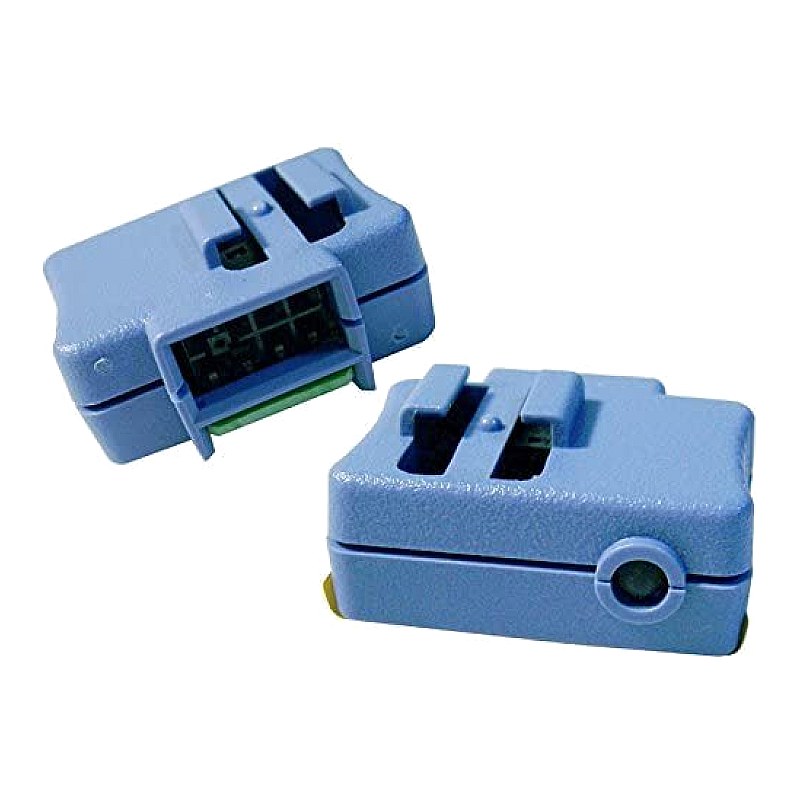
46C7528 IBM Virtual Media Key for X3650 M2 M3 X3550 M2 M3

R389.85
was
Includes VAT
Tell me if the price drops
IBM Virtual Media Key for X3650 M2 M3 X3550 M2 M3 FRU(s): 46C7528 46C7526 46C7527
This is an Ibm ibutton virtual media key
- Brand: IBM
- IBM FRU: 46C7526 46C7527
- Specs:-
- :: Type: System x Virual Media Key
- Compatibility:
- :: ::IBM x-Series supported:
x3550 M2, x3650 M2 and iDataPlex dx360 M2, x3550 M3, x3650 M3 and iDataPlex dx360 M3
- Application: This virtual Media Key Enables the IMM remote graphical console, keyboard, mouse functions for IBM M2/M3 servers.
- Condition: New
- Warranty: 1 (one) year Tekmart Africa warranty
Key points to note on these46C7526 IBMVirtual Media keys:-
This little IBM Virtual Media Key opens up for features:
An optional Virtual Media Key provides additional systems management capabilities, including Web-based out-of-band control; virtual floppy and optical drive support; Windows “blue screen” error capture; LDAP and SSL support; and remote redirection of PCI video, text, keyboard and mouse (cKVM). And it does all this without consuming a valuable adapter slot.
Integrated Management Module
In older System x servers, the Integrated Management Module (IMM) consolidates the service processor functionality, Super I/O, video controller, and remote presence capabilities in a single chip on the server system board. The IMM consolidates service processor functionality previously provided in the BMC and the Remote Supervisor Adapter II in System x and BladeCenter products.
Lenovo offers two levels of IMM, Standard and Premium. If the server has IMM Standard functionality, it can be upgraded to IMM Premium by purchasing and installing a Virtual Media Key (either part number 46C7526 or 46C7527, depending on the server) on the server system board.
This key is a physical component (Figure 1). However, no new firmware is required. IMM Premium provides Remote Presence and Virtual Media capabilities.
Figure 1 below shows where the Virtual Media Key is installed in one of the supported servers (x3620 M3).Figure 1. Installing the Virtual Media Key in the System x3620 M3IMM Standard has the following features:
:: Access to server vital product data (VPD)
:: Advanced Predictive Failure Analysis (PFA) support
:: Automatic notification and alerts
:: Continuous health monitoring and control
:: Choice of a dedicated or shared Ethernet connection
:: Domain Name System (DNS) server support
:: Dynamic Host Configuration Protocol (DHCP) support
:: E-mail alerts
:: Embedded Dynamic System Analysis (DSA)
:: Enhanced user authority levels
:: LAN over USB for in-band communications to the IMM
:: Event logs that are time stamped, saved on the IMM, and that can be attached to e-mail alerts
:: Support for Industry-standard interfaces and protocols: IPMI V2.0, CIM, and SNMP
:: OS watchdogs
:: Remote configuration through Advanced Settings Utility (ASU)
:: Remote firmware updating
:: Remote power control
:: Secure web server user interface
:: Serial over LAN
:: Server console serial redirection
:: User authentication using a secure connection to a Lightweight Directory Access Protocol (LDAP) server
IMM Premium (as enabled using the Virtual Media Key) adds the following features in addition to the features of IMM Standard:
:: Remote presence, including remote control of server
:: Operating system failure screen capture and display through the web interface
:: Virtual media allowing the attachment of a diskette drive, CD/DVD drive, USB flash drive, or disk image to a server
- Free collection from our store
- Secure checkout