VGA to HDMI Adapter / Converter with Audio-(PC-VGA Source Output to TV/Monitor with HDMI Connector), Active Male VGA in Female HDMI 1080p Video
- Brand: Generic
- Specs:-
- :: Type: Video Port Gender changer / convertor
- Condition: New
- Warranty: 1 (one) year Tekmart Africa warranty
-
Key points to note on these Female VGA to F HDMI Adapter Video Adapters:-
This portable digital VGA to HDMI adapter connects VGA cable to HDMI-equipped TV, monitor or external projector for use with laptops, desktops, projectors or other video equipment.
As stated above, these Portable VGA-to-HDMI Adapter/Converters help to easily hook up older stylish computer/laptop with VGA output to TV, monitor or projector with HDMI input for video streaming, game playing or sharing content.
They support Video and Audio Synchronously. VGA output/HDMI input supports video resolution up to 1920 x 1080/60Hz, Supports 24-bit;Transmit stereo audio via male 3.5mm AUX Mini Jack.
They are Plug and Play.The USB connector MUST be connected to get power for the bulid-in active VGA-HDMI chipset.Compatible with Windows 7/8/10, Linux OS.
ONLY FROM VGA-TO-HDMI Displays (TV/monitors).It only converts from VGA (analog signal output ) to HDMI (digital signal).Can NOT be used as a HDMI-to-VGA converter cable.
Features, in a nutshell:
It supports up to 1080p output and offers high resolution and signal conversion.
Plug-and-play setup - quick and easy installation with no software drive needed.
Includes:
- :: 1 x VGA to HDMI Convertor
- :: 1 x 3.5mm audio cable
- :: 1 x USB cable
-
How to set these up:
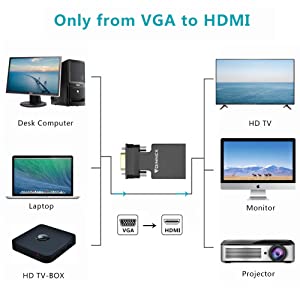
ONLY from VGA to HDMI
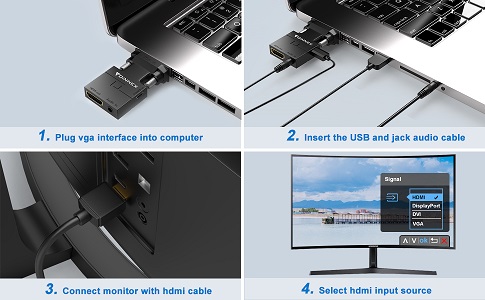
HOW TO USE IT?
- 1.Insert the VGA into the computer (desktop/laptop/notebook/DVD)
- 2.Insert the USB into the related interface on computer for getting the supplementary power.
- 3.Insert the 3.5 Mini Jack into the Audio output on your source device (PC, Laptop etc.)
- 4.Insert the HDMI to displays with HDMI female interface. (TV, monitor,projector or display screen)
- 5. If there are more than one inputs on your displays.
- Generally, signed as HDMI 1/HDMI 2,/HDMI 3 or DVI/DP/HDMI and others
- Please select the corresponding HDMI input interface on your TV screen.
- FOR EXAMPLE:
- If you want to connect the HDMI cable to the HDMI 2 interface on your TV.
- Please select HDMI 2 input on your TV with the remote control.
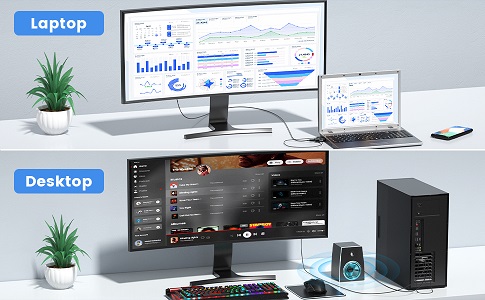
Two modes of use
Our vga to hdmi adapter converter can effortlessly add a second monitor or display to your pc / laptop. It can be viewed in mirror mode and expand mode.
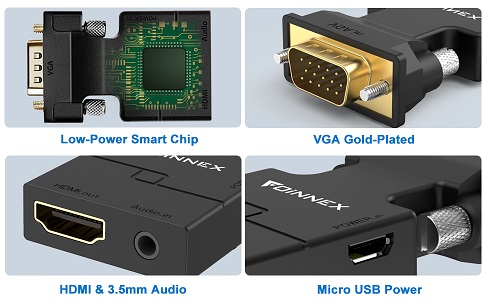
Broad compatibility
SUPPORT VGA RESOLUTION:
- :: From 800*600 to 1920*1080 input;
SUPPORT HDMI RESOLUTION:
- :: Up to 720P/1080i/1080P@60Hz.
- Compatible OS:
- :: Windows, Linux OS
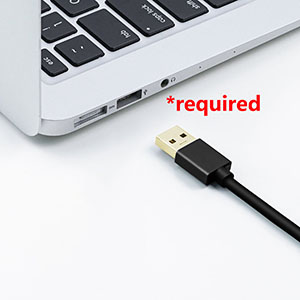
The USB MUST be connected for supplying power for the built chip.
The 3.5mm audio jack need to be connected to earphone port, not the microphone port or a speaker.
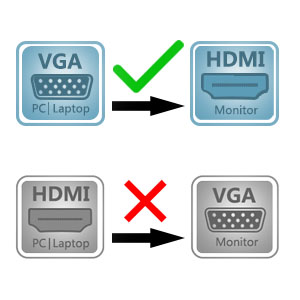
ONLY VGA TO HDMI:
VGA to HDMI adapter cable is one-way design. It only converts from VGA to HDMI
Can NOT be used as a HDMI to VGA cable


 English