HP Dual 8GB microSD EM USB Kit HPN: 741281-001,799057-001,741279-B21
- Brand: HPE
- Part #: 741281-001
- Alt. Part #: 799057-001,741279-B21
- Specs:-
- :: Type: Server maintenance options
- :: Description: microSD EM USB Kit
- Compatibility
- :: HPE ProLiant WS460c G9
- :: HPE Apollo 2000 G10 Plus
- :: HPE Apollo 4200 G10
- :: HPE Apollo 4200 G9
- :: HPE Apollo 6500
- :: HPE ProLiant BL460c G9
- :: HPE ProLiant BL660c G9
- :: HPE ProLiant DL120 G9
- :: HPE ProLiant DL160 G10
- :: HPE ProLiant DL160 G9
- :: HPE ProLiant DL180 G10
- :: HPE ProLiant DL180 G9
- :: HPE ProLiant DL20 G10
- :: HPE ProLiant DL20 G9
- :: HPE ProLiant DL325 G10
- :: HPE ProLiant DL325 G10 Plus
- :: HPE ProLiant DL360 G10
- :: HPE ProLiant DL360 G9
- :: HPE ProLiant DL380 G10
- :: HPE ProLiant DL380 G9
- :: HPE ProLiant DL385 G10
- :: HPE ProLiant DL385 G10 Plus
- :: HPE ProLiant DL560 G10
- :: HPE ProLiant DL560 G9
- :: HPE ProLiant DL580 G10
- :: HPE ProLiant DL580 G9
- :: HPE ProLiant DL60 G9
- :: HPE ProLiant DL80 G9
- :: HPE ProLiant ML110 G10
- :: HPE ProLiant ML110 G9
- :: HPE ProLiant ML150 G9
- :: HPE ProLiant ML30 G10
- :: HPE ProLiant ML30 G9
- :: HPE ProLiant ML350 G10
- :: HPE ProLiant ML350 G9
- :: HPE ProLiant XL170r G9
- :: HPE ProLiant XL190r G9
- :: HPE ProLiant XL230k G10
- :: HPE ProLiant XL260a G9
- :: HPE Proliant BL460c G10
- :: HPE Synergy 480 G10 Compute Module
- :: HPE Synergy 480 G9 Compute Module
- :: HPE Synergy 620 G9 Compute Module
- :: HPE Synergy 660 G10 Compute Module
- :: HPE Synergy 660 G9 Compute Module
- Condition: New
- Warranty: 1 (one) year Tekmart Africa warranty
-
Key points to note on these 741281-001 HPE Dual 8GB microSD EM USB kits:-
The above servers support the installation of the Dual 8Gb microSD Enterprise Midline USB device on the server's internal USB connector.
The USB key is designed for VMware boot. Hewlett Packard Enterprise Intelligence Provisioning does not support installing an operating system on a USB key.
This USB storage device contains a dual-microSD card module that supports up to two SD, SDHC, or SDXC storage cards providing data redundancy through a mirrored RAID-1 configuration. This USB storage device connects to an internal USB connector and is configured upon boot.
If you install ESXi on a microSD card and if you use HP Proliant Servers you may be interested in these kits. If one of the SD card fails, the configuration of your ESXi host is still available and functional on the second SD card. In this case just replace the module with a new one, install the surviving SD card and configure it as primary.
Please observe the following requirements:-
• :: Two microSD cards must be installed at all times or BIOS will flag an error case.
• :: Hewlett Packard Enterprise requires only one user LUN, formatted as FAT/FAT32.
• :: System ROM must be v2.20 or later
How to install the module and VMware ESXi?
Installation and configuration of the module is really easy.
Plug in the microSD card module to the internal USB port and power on the server. The microSD card module is automatically configured and ready to use.
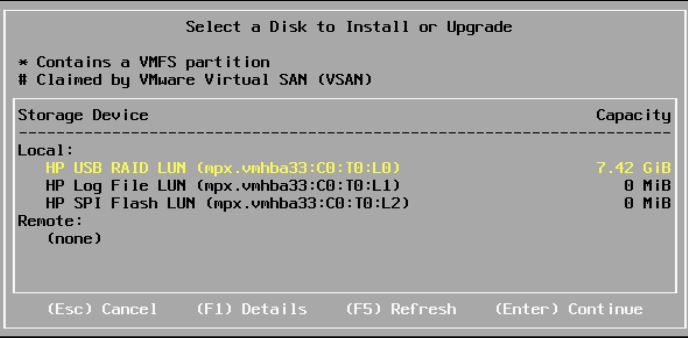
When you install VMware ESXi, you can select it as storage device during the install procedure. It shows up as “HP USB RAID LUN”:
The module has three status-LEDs:-
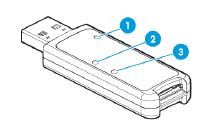
- LED 1 – Power LED -meaning
Green: device is on and at least one microSD card is functioning
Red: both microSD cards have failed
- LED 2 – SD Card 2 -meaning
LED on: microSD card has failed
LED off: microSD card is healthy
- LED 3 – SD Card 1 -meaning
LED on: microSD card has failed
LED off: microSD card is healthy


 English