Dell DB9 Female Serial to 3.5mm 4M Male Stereo Jack Cable DPN: 4R3WX,04R3WX
- Brand: Dell
- Part #: 4R3WX,04R3WX
- Specs:-
- :: Type: Server maintenance cables
- :: Description: Dell DB9 Reset Cable to 3.5mm Plug (Stereo 3.5mm Jack to DB9 Female Serial Port)
- :: Length: 4M
- Compatibility:-
- ME Series
- :: OEMR ME40XX and ME4XX
- :: Dell EMC PowerVault ME4012
- :: Dell EMC PowerVault ME4024
- :: Dell EMC PowerVault ME4084
- :: Dell EMC PowerVault ME412 Expansion
- :: Dell EMC PowerVault ME424 Expansion
- :: Dell EMC PowerVault ME484
- Condition: New
- Warranty: 1 (one) year Tekmart Africa warranty
-
Key points to note on these 4R3WX Dell Reset Cables:-
These DB9 Serial Cable Female to 3.5mm Male Stereo Cable are primarily designed and used to transfer Serial Data back and forth from Small devices (** not an audio signal **). The cable is also a firmware upload cable.
This cable is used for out of band management tasks such as initial configuration, resetting a forgotten password or investigating an unresponsive controller module where the management interface is unreachable.
If the supplied cable cannot be located, a USB-A to USB Mini-B (5 pin) cable can be used instead (Dell P/N TYM7H). These are not supplied with the PowerVault ME4 series. Typically, such USB cables are used with printers and camera devices.
Each PowerVault ME4 controller module has two CLI ports with an interface for either a USB Mini-B cable or a 3.5mm stereo plug located next to the Ethernet management port.
The ports labelled Service 0, 1, 2 are debug ports that are used only on instruction from Dell technical support !.
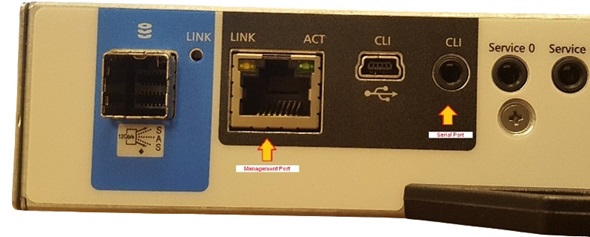
Connecting the DB9 to 3.5mm stereo plug serial cable to a host.
|
|
 |
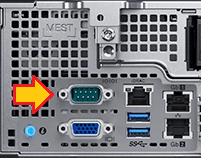
| Figure 2: Serial port connector on PowerEdge R740 |
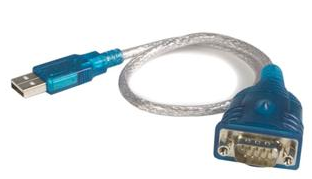
Figure 3: USB to serial adapter |
Serial port connectors may still be found on Dell 14 Gen and older PowerEdge servers. If you are using a laptop, you need a USB to RS232 serial adapter. Depending on the operating system used, a device driver may need to be installed for USB to serial adapter ports to be recognised in Microsoft Windows device manager.


 English