IBM / Lenovo Compute Book X6 DDR4 For IBM or Lenovo System X3850 X6 / X3950 X6 Compatible with E7-X8XX V3 SERIES / E7-4800V3 / E7-8800V3 / E7-X8XX V4 SERIES / E7-4800V4 / E7-8800V4 Part #: 00D0402
- Brand: IBM
- Part #: 00D0402-U(A)
- Alt. Part #: 00D0402
- Specs:-
- :: Socket Type: FCLGA2011
- :: Processor Type: Intel Xeon E7-X8XX V3 Series / Intel Xeon E7-4800V3 / Intel Xeon E7-8800V3 / Intel Xeon E7-X8XX V4 Series / Intel Xeon E7-4800V4 / Intel Xeon E7-8800V4 Series
- :: No.of Processors Supported: One Processor Per Compute Node (1)
- :: Memory Type: DDR4
- :: Memory slot #: 24 Memory Slots
- :: Compatibility: Lenovo X3850 / X3950 X6 Systems
- :: Condition: New
- :: MPN: 00D0402-U(A)
- Warranty: 1 (one) year Tekmart Africa warranty
-
INT271224OSST2024
**Eligible for immediate collection / shipping upon order confirmation*
Key points to note on these 00D0402 Lenovo Compute Books:-
The compute book is in the front of the server. Each compute book must have a minimum of one microprocessor, one DIMM, and one fan-pack installed. It provides the following connectors and slots:
- :: One microprocessor socket
- :: 24 DDR3 DIMM connectors (Models with the DDR3 compute book)
- :: 24 DDR4 DIMM connectors (Models with the DDR4 compute book)
- :: Two 60 mm counter-rotating fan bays
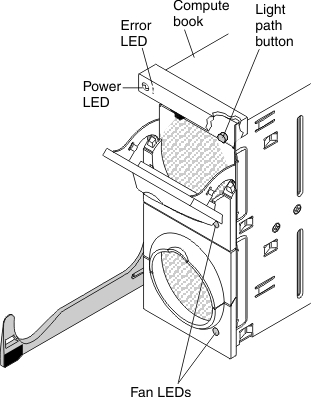
The compute book also provides and a light path button. Press this button to light the LEDs on the board when the compute book has been removed from the server. Any LEDs that were light before the compute book was removed from the server will be lit when the light path button is pressed.
The following illustration shows the front view of the compute book:
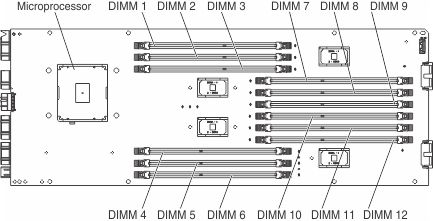
The following illustration shows the location of the microprocessor and DIMM connectors on the microprocessor side of the compute book board:
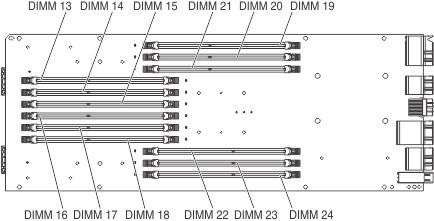
The following illustration shows the location of the DIMM connectors on the non-microprocessor side of the compute book board:


 English